 View Upcoming Digital Marketing, Media and Advertising Conferences & Exhibitions
 Phone:

Shoppable Live Streams Are Reshaping Online Retail
Live commerce and pin-to-buy streams let a host demonstrate products live while viewers tap a pinned item and buy within the viewing experience. The format joins video, product information, and a direct path to a sale. For U.S. retail and marketing teams, it offers another way to reach people and answer questions while they shop. It works best when the product needs to be seen or explained.
That can matter for apparel, beauty, home goods, collectibles, and other items that shoppers want to inspect before buying. Viewers can see how a product looks in use, hear a host explain its features, and respond in real time.
Brands still need to weigh the audience, channel, product, and work involved. The right fit depends on what shoppers need and how the business wants to sell. The format is most useful when a product demonstration can resolve a real question before checkout.
What Are Live Commerce & Pin-to-Buy Streams?
Live stream shopping is a real-time video sales format that combines a product demonstration, viewer interaction, and a way to buy. It brings a host, product listings, live chat, and checkout together in one shopping experience. The live element lets viewers ask questions while the product is on screen.

A pinned product card is a tappable product listing held on screen or in the chat so viewers can open it during a live broadcast. Live commerce combines video, shopping, and a purchase path during a broadcast. Social commerce is broader: it also includes shoppable posts and online stores that do not use live video.

Examples include TikTok Shop, YouTube, Instagram, and a brand’s own website. Each channel can pair a live host and product demo with a route to checkout. The exact features vary by platform.
U.S. retail e-commerce sales reached an estimated $347.3 billion in Q3 2026, up 1.6% from Q2 and 10.4% from Q3 2025. E-commerce made up 17.9% of total retail sales, as shown in the U.S. Census Bureau’s quarterly report.
That wider online market gives retailers a reason to test new ways to help shoppers choose. Live shopping adds interaction to the online store, though viewers still need a clear way to find each product. A pinned product card is useful only when it is easy to find and leads to a clear purchase path.
From Product Demo to Checkout
A host can show a jacket on camera, answer a sizing question in chat, and pin that item while viewers are watching. This is an example of live streaming that turns a product demo into a chance to ask questions and shop. Real-time answers can help viewers judge fit before they buy.

Make the product and the purchase action clear while the host is discussing them. The host can point out fabric, pockets, or other details, then respond to relevant questions in live chat. Viewers can see the item as the host handles it, rather than relying only on still product photos.
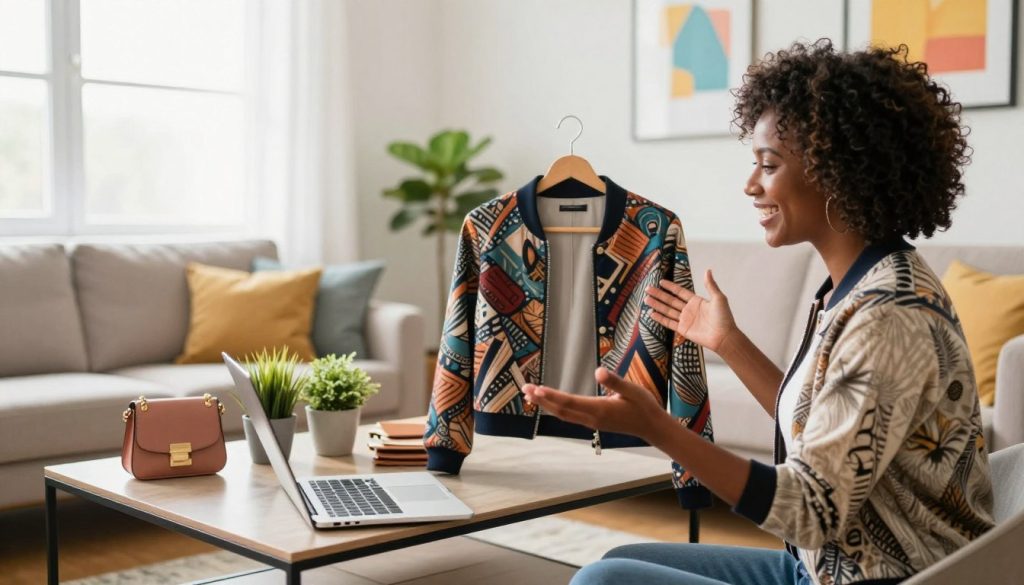
Product demonstrations and audience interaction
A strong demonstration uses the product in a way that reflects normal use. A host might show a bag’s straps, open its pockets, and explain what fits inside. Viewers can ask about size, color, care, or how a feature works.
The host can then switch to another featured product and pin its card. Clear transitions help viewers follow which item is being discussed. Hosts who endorse a product must clearly and conspicuously disclose paid or other material relationships, as the Federal Trade Commission requires.
Pinned items, checkout, and replay
When a platform supports in-stream checkout, viewers can select the pinned product card and complete the order without leaving the stream. Other channels may open a product page or store checkout. The host should say which item is pinned and what viewers should tap.
Replays and short clips can keep showcasing products after the broadcast ends. A clip may help a shopper who missed the live demo see a product feature or hear an answer again. Make the purchase action clear before the host moves on to the next product.
Live Shopping Formats for Different Buying Situations
A public social stream suits discovery, while a private video session suits a shopper who needs individual guidance. Choose the format based on how a buyer finds the product and how much help they need. Live commerce and pin-to-buy streams in 2022 were already familiar in spirit to viewers of televised home shopping.
Use a public stream for broad reach and a private session for one-to-one advice. QVC is a familiar example of television home shopping that came before interactive social streams. Today’s live shopping adds chat and tappable product cards, so viewers can respond and open an item during the broadcast.
- Social-platform streams help brands and creators show products to people browsing social content. They suit discovery and conversation with a broad audience.
- Marketplace livestreams put a product demo beside a marketplace’s existing shopping experience. They can suit sellers seeking traffic from platform shoppers.
- Brand-owned streams give a business more control over its own site experience. The stream can sit beside the brand’s product details and store content.
- Private video sessions let a host focus on one shopper’s needs. They can suit high-consideration purchases that need individual advice.
Auctions fit categories where bidding is part of the appeal, such as collectibles. A fixed-price stream works better when shoppers expect to see a set price and decide whether to buy. The host and channel can shape the event around that buying habit.
One format does not serve every product or audience equally well. A collector may value a live auction, while a shopper choosing a complex item may want direct guidance. Match the format to how much explanation a buyer needs before making a decision.
Which Platforms Fit U.S. Sellers’ Goals?
For discovery-led U.S. sales, start by evaluating TikTok Shop; choose Amazon Live for an existing Amazon business and Whatnot for auction-friendly collectibles. Brand-owned streaming suits businesses that put their own site experience first. The best live commerce and pin-to-buy streams depend on the seller’s audience, product, and sales goals.
There is no single best platform for every seller because discovery, customer ownership, and product category differ. Check where a brand’s audience already shops, and whether the channel supports the way its products are sold. A popular platform can still be a poor fit if its checkout or customer data rules conflict with business needs.
Social discovery and marketplace audiences
TikTok Shop is a strong starting point for discovery-led reach. It is forecast to account for 22.8% of the U.S. social commerce market in 2026, and 51% of U.S. TikTok users are forecast to buy on the platform that year. Those forecasts make it worth considering for brands seeking social reach.
Amazon Live fits sellers already active on Amazon. Live commerce and pin-to-buy streams on Amazon can connect a demo with shoppers using Amazon’s marketplace. Amazon Live is embedded there, which makes it a natural fit for businesses already selling through that channel.
Whatnot supports live auctions and fixed-price listings, making it a fit for collectibles and auction-style communities. It generated $8 billion in GMV in 2025. Its shoppers spent over $75 million on Black Friday 2025, three times the previous year’s total, as described in EMARKETER’s report on Whatnot.
Brand-owned and consultative shopping
A brand-owned stream suits sellers who want to shape the site experience and connect video with their own store. It may also give the business more control over how shoppers move from content to product pages. The tradeoff is that the brand must bring viewers to the event.
Instagram and Facebook have added live shopping tools for brands and creators. Meta launched Live Video Ads on Instagram and added in-stream shopping tools on Facebook in June 2026. QVC gained over 100,000 customers from TikTok Shop in Q2 2025, showing how established retailers can also use social channels.
Choose by the job the channel needs to do, not by a universal ranking. Check whether checkout, inventory, and customer data stay where the business needs them before choosing a channel.
Benefits and Limits of Live Commerce for Retail
U.S. livestream ecommerce sales are forecast to grow faster than the number of buyers in 2026. Sales are forecast to rise 35% to $19.76 billion, while buyer growth is forecast to slow to 9.5%. That gap points to more sales from a growing format, not a guarantee for each seller.
Market growth does not ensure that every platform, brand, or stream will gain sales. Demonstrations let shoppers see product details, while chat gives them a chance to raise concerns before buying. This can make the format useful when questions about fit, use, or features hold up a decision.
Discovery, engagement, and conversion
Four in five livestream shoppers discovered a new brand or product at a live shopping event in a December 2025 Adobe survey. Two-thirds made a spur-of-the-moment purchase after clicking on a livestream. These results show why discovery and impulse buying can matter to retailers.
Impulse purchases can add sales, but offers should still give viewers clear product facts, prices, and terms. A countdown or limited offer should reflect a real limit, not pressure viewers with false urgency. Hosts can invite a decision without hiding what a shopper needs to know.
Chat also gives a brand a chance to hear where viewers get stuck. Repeated questions about a size or feature can point to a gap in the product page or demo. That feedback can guide later content, even when a stream does not lead to an immediate sale.
Trust, returns, and tradeoffs
Live shopping cannot remove the usual limits of online retail. A product shown on camera may look different on a shopper’s device, and a quick answer may not cover every detail. Clear policies and complete product information still matter.
Platform results can change even as the overall market grows. TikTok Shop’s livestream share of total sales fell from 26% in July 2024 to 18% in July 2025. That change cautions against treating one channel’s past results as a promise of future reach.
Conversion and return rates depend on the product, audience, offer, and fulfillment experience. A live demo may answer one shopper’s concern but leave another’s unanswered. Treat urgency as a prompt to make a decision, not a substitute for clear product information.
Plan and Run a Live Shopping Pilot
A focused first pilot is easier to learn from when it has one goal and a short, related product lineup. Keep the scope small so the host can show each item well and the team can review what happened. A clear goal might focus on product interest, sales, or viewer questions.
Choose 3-5 hero products for a first broadcast. A short lineup makes it easier to keep the content useful and stay on time. Trying to showcase too many products is a common first-pilot mistake because each item gets less room for a real demonstration.
Before the broadcast
Set one goal and choose products that are related and easy to show on camera. A set of skincare items, for example, can share one routine and answer connected questions. Keep the lineup to 3-5 products that offer a visual detail or use case.
Promote the event 3-5 days before it begins. Use a teaser that names the product category and gives viewers a reason to attend. Prepare a loose run of show with an opening, product order, key details, and time for chat.
Give the host the product facts, prices, and any offer terms before the event. A simple outline can help the host stay on track without making the stream sound scripted. Make sure the team knows who will answer chat and who will handle any order issues.
During the broadcast
Open with the product and explain what viewers will see. Show the item in realistic conditions, not only from its best angle. A kitchen tool can be used on a counter, while an apparel item can be shown in motion.
Answer relevant chat questions as they come in, and repeat the product name when changing items. Use a clear call to action that tells viewers how to open the pinned product card. The host should also state key limits on discounts or stock when those details affect a purchase.
Keep the event moving without rushing through useful answers. If a question needs a longer reply, the host can give the short answer live and direct the team to follow up. This keeps viewers informed without losing the event’s pace.
After the broadcast
Make the replay available when the platform allows it. Follow up with viewers who showed interest, using a relevant message or product detail rather than a broad sales pitch. A replay can also help shoppers who could not attend live.
Review whether the goal was met and note the questions viewers asked most often. Keep the next broadcast focused on the change most likely to improve the result.
Tools and Costs for a Shoppable Stream
A phone-based pilot can keep equipment spending low when the business already has a suitable device and checkout system. Basic new equipment typically costs under $500 in that case. Professional production commonly runs from hundreds to several thousand dollars per event.
Viewers can generally watch a live shopping broadcast for free, but purchases, internet service, or paid access set by a broadcaster may cost money. Production needs, platform and creator fees, paid promotion, and crew all affect what a seller spends.
Production and commerce essentials
A basic setup needs a camera, lighting, microphone, and a computer or phone to run the stream. A reliable upload connection helps keep video and chat working. A source checklist gives 5 Mbps as the minimum upload speed for 1080p.
The selling side also needs working product tags, checkout, inventory sync, and live chat moderation. These tools connect the on-screen product with stock and orders. A basic setup can use a phone for video and a separate computer for chat and order checks.
- Camera and lighting that let viewers see the product clearly.
- Microphone and phone or computer for the host and stream.
- Reliable upload connection for steady live video.
- Live chat moderation, product tagging, and checkout.
- Inventory sync to keep product availability current.
Cost factors for a first broadcast
With a phone or computer already available, basic new equipment can typically cost under $500. Professional production commonly runs from hundreds to several thousand dollars per event, depending on crew and production needs. These are typical estimates, not prices for a named provider.
Platform or creator fees may add to the budget, as can paid promotion and extra staff. Higher production needs can also raise costs. A simple stream may need less crew than a broadcast with several cameras, a larger set, or a complex show plan.
Live stream costs depend on whether a business needs new equipment, paid reach, or a production crew. Viewers usually pay nothing to watch, though they may pay for products, internet service, or paid access. A broadcaster can also choose to restrict a stream to paying viewers.
The main downside of streaming is that live mistakes cannot be edited out during the broadcast. Poor audio or video can make details hard to follow, latency can delay chat, and inventory errors can lead to bad orders. Test audio, picture, checkout, and stock updates before inviting viewers.
Measure Results Beyond View Counts
A stream’s performance is clearer when reach, engagement, sales, and margin are measured together. View counts alone do not show whether viewers wanted to buy. Compare results with relevant product-page performance or past streams.
Group measures by the stage they describe, and define the target before reviewing results. Gross merchandise value (GMV) is the total value of goods sold. Average order value (AOV) is the average amount spent per order.
Funnel metrics for a live shopping stream
- Reach: Track total views and peak concurrent viewers, the largest number watching at one time.
- Engagement: Review comments, shares, likes, and watch time to see how viewers responded.
- Conversion: Measure click-through rate (CTR) and conversion rate to check whether viewers opened products and placed orders.
- Sales impact: Track GMV and AOV to see sales value and typical order size.
- Efficiency: Review net margin after relevant costs to judge whether sales produced value for the business.
Views can include people who watched briefly and had little interest in the offer. Watch time, product clicks, and chat can show more about how viewers engaged. A high view count does not by itself prove that the stream influenced a sale.
Turning results into the next test
Compare a stream with a similar product page, past broadcast, or other relevant sales period. A comparison works best when products, prices, and promotion are close enough to make the results useful. Note where viewers left or stopped interacting, if the platform reports that detail.
Separate live-session purchases from replay activity when the platform provides that breakdown. Replay orders can continue after the host signs off, so combining them with live purchases may hide how the broadcast performed in real time.
Use the numbers to pick one change, such as a clearer opening or a longer product demo. Then keep the other parts of the event stable enough to judge the effect. Choose one measurable change for the next stream and check whether it improves the same funnel stage.
Conclusion
A useful live shopping stream makes product discovery, questions, and buying feel like one connected experience. Live commerce is most useful when a live demonstration and interaction help a shopper make a decision. It is a sales channel to test, not a promise of sales growth.
Brands can learn from a focused pilot without making the first broadcast complex. Choose a small group of related products and set one clear goal for the event. Then review whether the stream helped shoppers understand the products and move toward a purchase.
The best next step is to test one product category with an audience that has a reason to see it live. Choose one product category, set a measurable pilot goal, and schedule a first stream.












No comments